Steady footage,
right inside your editor.
A stabilization plugin for Premiere Pro and DaVinci Resolve. It works from the gyro data your camera recorded.
WindowsMac
Gyro first.
Many cameras record how they moved, frame by frame. StabLab reads that motion from the file and steadies the shot from it, so it does not have to guess from the picture.
- SonyXAVC and MP4 from bodies that record it: FX3, FX6, A7S III, A7 IV, a6700, RX0 II, RX100 VII and others
- GoProHERO5 to HERO13
- DJIO4 and Avata
- Insta360Go and Ace Pro
- FPV camerasRunCam, Caddx and Hawkeye, with their own gyro files
- Gyro logsFrom Betaflight or Gyroflow’s .gcsv, saved next to the video with the same name: StabLab finds it by itself
StabLab works from gyro data: a clip without it is not stabilized. Turn the camera’s own stabilization off: StabLab steadies the shot best from the camera’s own motion.
What you can set.
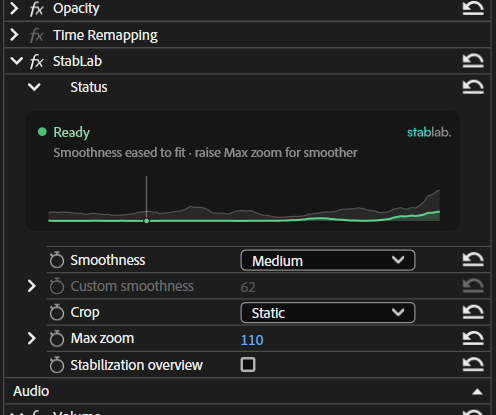
- StatusReady or not, what StabLab works from, how far it zooms.
- SmoothnessPresets, or your own value.
- Crop and Max zoomStatic, Dynamic or None, with a zoom limit.
- Stabilization overviewThe whole picture with a frame around what stays. Turn it off before you export.


In Premiere Pro and DaVinci Resolve.
Your footage stays on your computer.
StabLab steadies it right there. The footage is never uploaded; what the app does send is a license check and diagnostic logs without file names.
- Windows 10 or 1164-bit · Premiere Pro and DaVinci Resolve
- macOS 14 or laterApple Silicon · Premiere Pro and DaVinci Resolve
- Any graphics cardFastest with one; it also runs on the processor
- Tested withPremiere Pro 2026 · DaVinci Resolve 21
Questions? Answers.
Does my camera record gyro data?
If it is on the list above, very likely yes. If not, StabLab can’t stabilize it: it needs a camera that records gyro data, or a gyro log saved next to the video with the same name.
Do I have to turn off in-camera stabilization?
Turn SteadyShot off in the camera. StabLab steadies the shot best from the camera’s own motion; on clips the camera already stabilized, the result can be worse.
Does it cost anything?
No. Everything in StabLab is free with a CT Lab account, through CT Lab Hub.
Is my footage uploaded?
No. The footage and its frames never leave your computer. StabLab checks your license and sends diagnostic logs, without file names or paths.